Originally published on cryptic.red on 14 September 2021, updated 12 April 2024. Archived here on dmcdonald.net 2026-05-19 ahead of the cryptic.red domain shutdown.
Intended Audience: penetration testers, other technical cyber security professionals, and VoIP telephony engineers without €10k to spare.
2024-04-12 Update: a tool to exploit this vulnerability without going through quite so many manual steps has been released. voipire, on GitHub at github.com/CR-DMcDonald/voipire.
RTP sessions can be hijacked from RTP proxies by sending an RTP packet to the right port. rtpnatscan is the only tool I know which does this, sending four packets just containing RTP headers, scanning ports to find and redirect RTP. While rtpnatscan is smart enough to detect the resulting stolen audio stream, there is no way to save or listen to it. But as a pentester or security professional you'll want to listen to it so you can figure out if the RTP streams are encrypted or not, which makes a massive difference to the severity of the issue.
SIP Vicious Pro, a VoIP testing tool, reportedly does allow this, but the price is difficult to justify. At the time of writing the listed price is €800 a month, plus an additional €800 one-off mandatory training course. This comes to €10,400 for the first year.
That's a shame, because for smaller pentesting firms like mine that's just too much money for a tool I'll only use twice a year. To give you some context, the most expensive pentesting tool I use costs about £2k per annum, and I use it at least weekly.
Looking for other options, I found a way to use the rtpnatscan tool with a script and OSS tools to achieve what I wanted. Specifically I used rtpnatscan, Wireshark, Python, scapy, and Audacity in a hacky, rough process but one that provides enough evidence to be confident that a system is vulnerable and the RTP streams are unencrypted.
Warning: this attack will disrupt VoIP calls and leak private VoIP calls. Use with care and authorisation from the system owner.
Step 1: Prepare to capture RTP traffic
Start Wireshark listening on the interface you expect your RTP packets to come in on.
Step 2: Run rtpnatscan against all the ports
./rtpnatscan [target ip address] 16384 32767
The last two numbers are the start and end of the RTP NAT port range. By default, RTP proxies use ports between 16384 and 32767, inclusive. If the RTP proxy is vulnerable and there are ongoing calls using the ports in your range, you'll know you've started to receive RTP streams when you see output lines like this.
received 172 bytes from target port 16422, seq 62975
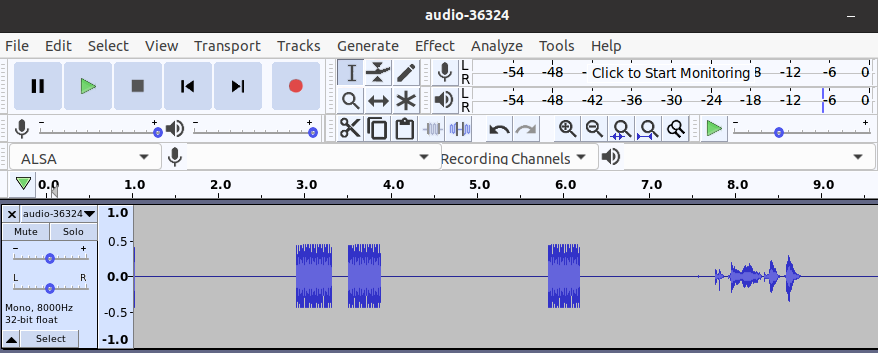
Wait a few seconds to get a snippet of the stream, press Ctrl-C and kill the application. Stop your Wireshark capture, and save the results as a pcapng file.

Step 3: Strip the RTP headers and save the raw audio
I've written a scapy Python script for this. Usage: ./rtp-red-cap.py [target ip address] [path to pcapng file]. This will spit out one .raw audio file for each RTP stream rtpnatscan found.
Step 4: Playing the audio file
In order to play the audio files you've just captured, you'll need to figure out the frequency, number of channels, and encoding format. This information is usually contained in the SIP signalling packets, which you don't have.
However, for audio calls 8000 Hz, ALAW encoding, and mono channel are a good first guess. You can play this on Linux with ffplay, for example:
ffplay -f alaw -ar 8k -ac 1 audio-36324.raw
Another alternative is to use Audacity. Click File → Import → Raw Data... and select the appropriate settings on the subsequent import raw data form.
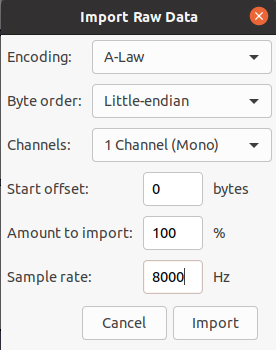
Click Import. If you hear nothing but pure white noise, the audio is probably encrypted. Unless you have access to the SIP traffic, you may be out of luck. If you heard what sounds like spoken words, but it sounds too fast or poor quality, you may need to try different variations of encoding, channels, and sample rates.
Step 5: Panic
If it works, you can export it from Audacity as a .wav file as evidence. Let your client or boss know the bad news. This isn't a well documented vulnerability, but from what I can tell you can at least solve the privacy concerns by encrypting the RTP traffic. You'll also want to ensure SIP is encrypted as well, as encryption keys are sent using the signalling channel.
TODO
I've started work on a tool that'll remove the need to run rtpnatscan as a separate tool, and make it more suitable for pentesters, but it needs a lot more work and testing.
(2024 update: that tool is now voipire.)